


How to Put Photos on an E Ink Phone Case
Last Updated: October 25, 2026
Quick Summary
Yes, an E Ink phone case can display photos. It shows a static image on a paper-like screen built into the back of the case, and that image stays visible until you send a new one. At ShopTapEink, we build battery-free cases that hold your favourite photo without using any power to keep it on screen.
- You send a photo by picking it in the companion app and holding your phone near the case.
- The app accepts JPG and PNG files, and screenshots work too.
- The case uses no battery; power comes from your phone's NFC chip only during transfers.
- Bold, high-contrast photos look best, and grayscale images often look sharpest.
- Cases ship free Australia-wide, arrive in 7 to 10 days, and include 30-day returns.
Table of Contents
- Can E Ink Cases Display Photos? Yes, Here's How
- How to Put Photos on an E Ink Phone Case
- E Ink Phone Case Image Quality: What to Expect
- E Ink Phone Case Supported Image Formats
- How to Change an E Ink Phone Case Picture
- Battery, Power and Everyday Usability
- Choose Your E Ink Case and Start Personalising
- Frequently Asked Questions
Can E Ink Cases Display Photos? Yes, Here's How
Yes, an E Ink phone case can display photos. It shows a static image on a paper-like screen built into the back of the case, and that image stays visible until you send a new one. At ShopTapEink, we build battery-free cases that hold your favourite photo without using any power to keep it on screen.
The technology is straightforward. Electronic ink uses tiny capsules that shift into place to form a picture. Once the image settles, it needs no electricity to stay there (Benefits|E Ink Technology).
That is the key difference from a normal screen. Your phone display uses power every second it is lit. An E Ink phone case uses power only in the moment you change the picture.
The result is a case that looks like a printed photo. It is readable in bright sun, and it never asks for a charge.
How to Put Photos on an E Ink Phone Case
Putting a photo on your case takes about a minute. You pick an image in the companion app, hold your phone near the case, and let NFC send it across. No cable, no pairing code, no account setup.
Here is the full process:
- Install the companion app on your phone.
- Choose a photo from your gallery or camera roll.
- Crop it to fit the display area.
- Open the send screen in the app.
- Hold your phone against the back of the case.
- Wait a few seconds while the image transfers.
- Check the result and resend if the crop looks off.
The first transfer is the only one that takes any real effort. After that, changing the picture is the same short routine every time.
For a closer walk-through of the app and the transfer step, see our guide to E Ink app setup and image transfer. If you want the NFC side explained in more depth, our page on transferring images via NFC covers it.
E Ink Phone Case Image Quality: What to Expect
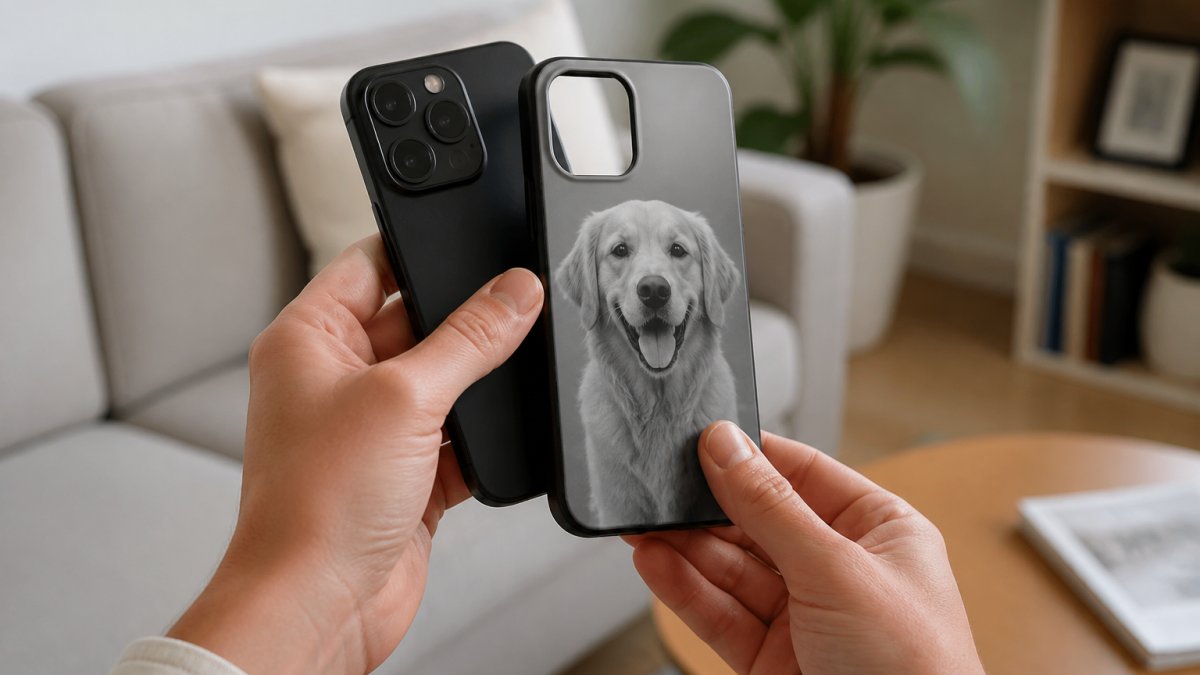
Expect a soft, paper-like image, not the sharp glow of your phone screen. An E Ink phone case image looks closer to a printed photo than a digital display. Bold, high-contrast pictures look best, and the result is best judged in daylight rather than under a desk lamp.
A few things shape how your photo turns out:
- Contrast matters most. A bright subject against a simple background reads clearly. A low-contrast scene (grey sky, beige wall, pale skin against a pale shirt) tends to merge into one tone.
- Busy photos lose detail. Fine patterns, dense foliage and tiny text blur together at typical case-display sizes. A close-up of one face usually beats a wide group shot.
- Colour is limited. E Ink shows a reduced colour range, so soft pastels can look flat and saturated reds can shift.
- Grayscale images often look sharpest. Black and white portraits hold up well because the display's strength is tone and contrast, not colour range.
- Resolution is capped by the panel, not your camera. A 48-megapixel phone photo carries far more detail than a case display can show.
The display is not a second screen. It will not show notifications, video, or anything that moves. It shows one still picture at a time, and that is the point.
If you want your photos to look their best, our guide to optimising images for E Ink shows how to adjust contrast and crop before you send.
E Ink Phone Case Supported Image Formats
The companion app accepts the standard photo files your phone already saves. That means JPG and PNG from an iPhone camera roll all work.
A simple rule: if you can see the photo in your gallery, you can send it to the case. Screenshots work too, which makes quotes and text designs easy.
E Ink Memories Case for iPhone 13–17 – Tap to Change Your Picture →
How to Change an E Ink Phone Case Picture
Changing the picture is the same as the first setup. Open the app, pick a new image, hold your phone to the case, and send. The display refreshes in seconds and holds the new photo until you change it again.
Most people settle into a rhythm. A new photo for a birthday, a quote for exam week, artwork to match an outfit. The case is built for that kind of swapping.
Watch out: if a transfer fails, the usual cause is holding the phone too far from the case or moving it mid-send. For more help, see our NFC pairing troubleshooting guide. Hold still for the full few seconds.
Battery, Power and Everyday Usability
The case uses no battery at all. Power comes from your phone's NFC chip during the transfer, and the E Ink display holds the image on its own after that. There is nothing to charge and nothing to wear down.
That split matters, so it is worth being precise about it:
- Changing the image draws power. The NFC radio in your phone energises the case and the display refreshes. This is a short burst, seconds, not minutes, and it is the only time the case asks anything of your phone.
- Keeping the image draws nothing. Once the capsules settle, the picture stays put with zero current. You could leave the case in a drawer for a month and the image would still be there.
- A failed transfer costs you a retry, not a flat battery. If the send drops out, the display either holds the previous image or lands in a partial state; you simply resend. The NFC burst is small enough that several retries in a row are not a meaningful drain.
Will it drain your phone? Only in the seconds it takes to send an image. Outside those moments, the case draws nothing. A common pattern is that people change the picture a few times a week and never notice it in their battery stats.
In daily use, the case works like any protective shell. It guards against drops and bumps, and the paper-like screen stays readable in direct sunlight. It is a protective case first and a picture display second. The display adds little thickness. Treat it like a printed photo behind a protective layer: avoid sharp objects on the display area and it will hold up to normal pocket and bag use.
Choose Your E Ink Case and Start Personalising
Picking the right case comes down to your phone model and the look you want. Each case fits one model only, so match it exactly before you order.
| Case | Best for | Price |
|---|---|---|
| E Ink Memories Case for iPhone 13-17 | Everyday photos and gifts across most iPhone models | $69.90 |
| NFC E Ink Case for iPhone Pro and Pro Max | Pro and Pro Max owners wanting a slim shell | $63.90 |
| Glass-Back NFC E Ink Case for iPhone 17 | A premium tempered glass finish on a new iPhone 17 | $79.90 |
| Round E Ink Display Case for iPhone 17 and 18 | A round display and magnetic design | $99.90 |
All four ship free Australia-wide, arrive in 7 to 10 days with tracking, and come with 30-day returns and Sydney-based support.
Best for: anyone who wants a case that changes with their mood. Skip if: you need a second screen for notifications. This is a picture display, not a screen.
Frequently Asked Questions
Can E Ink phone cases display photos?
Yes. An E Ink phone case uses a paper-like display on the back that holds a static image, including photos, artwork or quotes. You send the image from your phone via NFC, and it stays visible without using any power. The display is not a second screen, so it will not show notifications or video. Bold, high-contrast photos look best because E Ink has a softer, print-like finish rather than the bright glow of an OLED screen.
What image formats work best on an E Ink phone case?
Most companion apps accept common formats such as JPG and PNG. For the sharpest result on an E Ink phone case, use high-contrast images with clear subjects and avoid photos with lots of fine detail or subtle gradients.
How often can I change the picture on an E Ink case?
You can change the picture as often as you like. Each refresh takes seconds via NFC and does not require charging the case. E Ink displays are designed to hold a static image for long periods, and refreshing occasionally is normal use. If an image ever looks faded, a fresh upload usually restores contrast. There is no battery to drain, so changing designs frequently costs you nothing but a moment.
Will an E Ink phone case drain my phone's battery?
Only minimally. The case itself has no battery and uses zero power to keep an image on screen. Sending a new photo uses your phone's NFC, which draws very little power for a few seconds. In practice, changing your design once a day has a negligible effect on battery life compared with streaming video or gaming. The display holds its image on its own until you tap to change it.
Ready to carry a photo you love on the back of your phone? ShopTapEink builds battery-free E Ink cases that change with a tap, need no charging, and protect your device every day. Browse the iPhone E Ink case collection and pick your model to start personalising. Get started with ShopTapEink and make your phone unmistakably yours.

Inkcase vs Reinkstone: 2026 E Ink Case Comparison
5 Things to Know Before Buying an NFC Case for iPhone 16
Related Posts

Are Battery-Free Customizable Phone Cases Worth It?

5 Things to Know Before Buying an NFC Case for iPhone 16

Inkcase vs Reinkstone: 2026 E Ink Case Comparison

Does an NFC Phone Case Drain Battery? The Real Answer

E Ink Phone Case Battery Life: What to Expect

Hipoink Alternative for Creative Professionals: E Ink Cases
