


How Often Can E Ink Change: Safe Update Limits
Table of Contents
- How Often Can E Ink Change Without Damage
- Understanding E Ink Refresh Rate and Update Frequency
- E Ink Phone Case Image Change: What's Actually Safe
- E Ink Display Lifespan: How Long Does It Really Last
- E Ink Screen Wear: Ghosting, Residual Images, and Degradation
- Practical Update Intervals by Use Case
- Power Consumption and Battery Impact During Updates
- Maximising Your E Ink Case Lifespan
- Frequently Asked Questions
Last Updated: October 10, 2026
How Often Can E Ink Change Without Damage
The question of how often can e ink change comes down to understanding both the technology and the real-world limits of electronic paper displays.

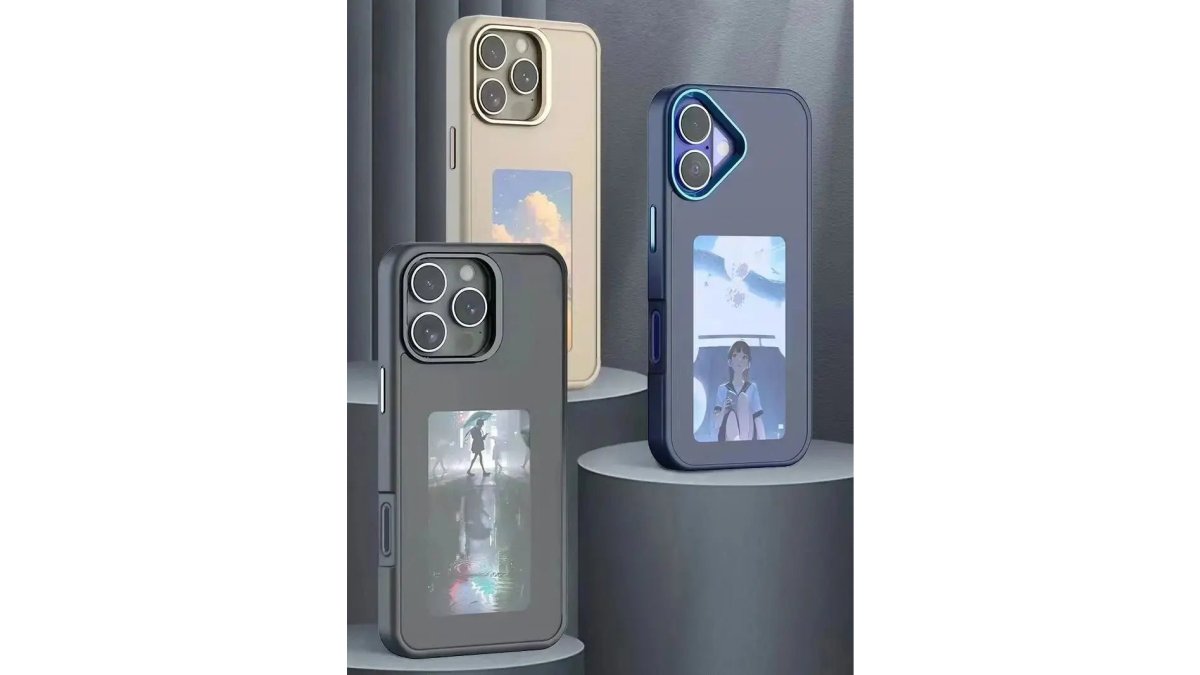
The short answer: you can change your E Ink display as often as you want without immediate damage. But there's a catch.
Think of it like a printed page. You can flip it a thousand times without it falling apart. But after a million flips, the paper wears thin.
Understanding E Ink Refresh Rate and Update Frequency
E Ink refresh rate describes how quickly the display updates when you send a new image. Update frequency is how often you choose to change the image.

Refresh rate is fast, modern E Ink panels update in 300-500 milliseconds.
Most E Ink displays are rated for 100,000 to 1,000,000 refresh cycles before noticeable degradation occurs. That sounds like a lot because it is. If you change your case image every single day, you'd need 2,700 years to hit 1 million cycles.
Partial Refresh vs Full Refresh
Not all refreshes are created equal. This distinction matters for display longevity.
A partial refresh updates only the pixels that changed. If you're swapping one photo for another, the entire display needs to refresh, but if you're just changing text on a mostly static background, only those text pixels update.
A full refresh rewrites every pixel on the screen, even the ones that didn't change. This is necessary occasionally to clear ghosting (residual images), but doing it constantly accelerates wear.
For your ShopTapEink case, every image change is essentially a full refresh because you're replacing the entire visual. That's fine, it's the intended use case.
Refresh Speed and Update Latency
Speed and latency are related but different. Refresh speed is how fast the pixels change. Latency is how long you wait between tapping your phone and seeing the new image appear.
Modern E Ink displays refresh in 300-500 milliseconds. Your ShopTapEink case uses NFC technology, which means the actual data transfer happens instantly, it's the E Ink panel's refresh that creates the visible delay. You tap, and within half a second, the new image appears.
Latency doesn't directly damage the display. What matters is the number of refresh cycles, not how quickly they happen. A refresh that takes 400ms versus 200ms causes the same wear to the panel.
E Ink Phone Case Image Change: What's Actually Safe
How often can e ink change your phone case design safely? The practical answer depends on your use case, but there's no daily limit that will harm the display.
If you're changing your case image once a week, you're well within safe territory. After one year, you've completed 52 cycles. After ten years, you've hit 520. You'd need to update your case thousands of times per year for decades to approach any meaningful degradation.
The real-world constraint is usually battery life on your phone, not the E Ink panel. Every NFC interaction drains a tiny amount of power from your device.
E Ink Display Lifespan: How Long Does It Really Last
E Ink displays are rated for 10-15 years of typical use before noticeable degradation. That's the manufacturer's estimate, and it assumes average update frequency, not constant changes.
The lifespan clock starts when the panel is manufactured, not when you buy it. A case sitting in a warehouse for two years before purchase has already aged two years. That's why buying from retailers with fresh stock matters.
Temperature matters more than you'd think. E Ink performs best between 0°C and 40°C. Leaving your phone in a hot car or a freezer accelerates degradation. Normal indoor temperatures are fine.
Refresh Cycle Limits and Switch Count
Every E Ink panel has a rated "switch count", the number of times pixels can flip between black and white before contrast degrades. This is measured in millions for modern panels.
A typical E Ink display is rated for 100,000 to 1,000,000 cycles. That's per pixel, not per image change. When you update your entire case, you're cycling millions of pixels simultaneously. But even so, the math works in your favour.
The first sign of degradation isn't complete failure, it's reduced contrast. The blacks become slightly greyer. The whites become slightly less white.
NFC E Ink Case for iPhone Pro and Pro Max →
Operating Conditions and Temperature
Temperature is the single biggest factor affecting E Ink lifespan. Heat accelerates chemical reactions inside the panel. Cold slows everything down but doesn't damage it.
Ideal operating temperature is 15°C to 35°C. Your pocket, a desk, or a bag stays in this range most of the time. Leaving your phone in a car on a hot day can push the panel above 40°C, which isn't catastrophic once or twice, but repeated exposure ages the display faster.
Humidity matters too, but less dramatically. E Ink panels are sealed, so normal moisture exposure isn't a concern. Submerging your phone is a different story, that's a waterproofing issue, not an E Ink issue.
E Ink Screen Wear: Ghosting, Residual Images, and Degradation
Ghosting is the most visible sign of E Ink wear. It's when a faint outline of a previous image remains visible after you've updated to a new one. This happens because not every pixel returns to exactly the same state after each cycle.
Ghosting isn't permanent damage, it's a visual artifact. A full refresh clears it. But if you see ghosting regularly, it means the panel is accumulating stress faster than normal. This usually indicates either excessive update frequency or poor operating conditions (usually temperature).
What Causes Ghosting and Image Retention
Ghosting happens because E Ink pixels don't always return to their original state perfectly. Tiny amounts of electrophoretic fluid, the "ink" in electronic paper, can get trapped or distributed unevenly. After hundreds or thousands of cycles, this imbalance becomes visible.
Image retention is similar but different. It's when a static image displayed for very long periods leaves a faint shadow.
Both ghosting and image retention are temporary if caught early. A full refresh clears them. But if they persist or get worse, it signals that the panel is degrading.
Preventing Permanent Damage to Your Display
The best way to prevent permanent damage is to avoid extreme temperatures and excessive update frequency. For most users, this isn't a concern, normal daily use is well within safe limits.
If you notice ghosting appearing regularly, it's a sign to update less frequently or check your storage conditions. Don't leave your phone in hot environments for extended periods. Keep your case out of direct sunlight when not in use.
Practical Update Intervals by Use Case
Different usage patterns have different safety profiles. Here's how to think about your specific situation:
| Use Case | Update Frequency | Safety Assessment | Notes |
|---|---|---|---|
| Daily aesthetic changes | Once per day | Very safe | 365 cycles/year; 3,650 after 10 years |
| Weekly mood updates | Once per week | Very safe | 52 cycles/year; 520 after 10 years |
| Seasonal changes | 4 times per year | Extremely safe | 40 cycles/decade; minimal wear |
| Constant experimentation | 5+ times daily | Safe but impractical | Battery drain is the real issue |
| Static display (no changes) | Never | Indefinite | Risk of image retention after months |
The "safe" range is enormous. Even aggressive daily use stays well below any meaningful degradation threshold. The real constraint is your patience, not the panel's durability.
Power Consumption and Battery Impact During Updates
Every NFC update drains a small amount of power from your phone's battery. This is the practical limiting factor for how often you'll actually change your case, not E Ink degradation.
A single NFC transaction uses roughly 0.1-0.5% of a typical smartphone battery. That's negligible. But if you update your case 20 times per day, you're looking at 2-10% battery drain just from NFC interactions.
For most users, this means updating your case a few times per week has zero battery impact. Updating daily is fine. Updating dozens of times per day becomes impractical for your phone, not for the E Ink panel.
Maximising Your E Ink Case Lifespan
To get the longest life from your ShopTapEink case, follow these practical steps:
- Avoid extreme temperatures. Keep your phone out of hot cars and freezers. Normal indoor and pocket temperatures are fine.
- Update at your own pace. There's no "best" frequency. Change your design whenever you want, daily, weekly, or monthly.
- Store in moderate conditions. If you're not using the case, keep it at room temperature away from direct sunlight.
- Use full refreshes occasionally. If you notice faint ghosting, perform a full refresh through the app to clear it.
- Don't obsess over update count. You'd need to update your case thousands of times per year for decades to approach any real degradation.
The E Ink panel in your ShopTapEink case is designed to outlast your phone. With normal use, you'll upgrade your device long before the display shows any noticeable wear. The technology is strong, the refresh limits are generous, and the real-world constraints are negligible.
The question of how often can e ink change your phone's look comes down to one simple truth: you can change it as often as you want without worrying about damage. Change your design whenever your mood or style demands it, the panel won't complain. Learn about E Ink technology and its applications shows that electronic paper has been refined over decades for durability. Shop our NFC E Ink Case for iPhone Pro and Pro Max or NFC E Ink Case for Galaxy S24 Ultra and S23 Ultra and start customising your phone today, your display will thank you.
Frequently Asked Questions
How often can you change the image on an E Ink phone case?
E Ink phone cases can handle hundreds of image changes without degradation. Most displays are rated for 100,000+ refresh cycles, which means you can change your design daily for years without damage. The key is understanding that a single image change uses minimal power and causes minimal wear. Frequent updates, even multiple times per day, are safe within normal use. However, avoid leaving the same high-contrast image static for months, as this can cause ghosting. For practical purposes, change your design as often as you like without worry.
Does refreshing an E Ink screen use power?
E Ink displays use power only during the refresh moment itself, not to hold the image. Once an image is displayed, it remains indefinitely without consuming battery. This is why E Ink phone cases are battery-free: the NFC technology sends the update signal, the display refreshes briefly, then consumes zero power until the next change. This makes E Ink fundamentally different from LCD or OLED screens, which draw power continuously. Your phone's battery impact from updating an E Ink case is negligible, comparable to a single NFC tap.
What causes ghosting on E Ink displays?
Ghosting occurs when a faint outline of a previous image remains visible after a new image is displayed. This happens because the electronic ink particles don't return to their exact neutral state after every refresh. Ghosting is temporary and usually clears with a full refresh cycle. To prevent persistent ghosting, avoid leaving high-contrast images (like pure black text on white) static for extended periods. Periodic full-screen refreshes clear residual images. Modern E Ink controllers manage this automatically, but rotating your design every few weeks keeps contrast sharp and prevents image retention issues.
How long does an E Ink display last before it needs replacing?
E Ink displays are rated for 100,000 to 1,000,000+ refresh cycles depending on the panel quality and controller. At one change per day, this translates to 270+ years of use. Real-world lifespan is measured not in years but in how the display degrades over time: contrast may gradually reduce, and ghosting may become more noticeable after many years of heavy use. For a phone case, you're far more likely to upgrade your phone or replace the case for aesthetic reasons before the E Ink panel itself fails. Operating temperature and avoiding extreme heat or cold extends lifespan significantly.
Massager Buying Guide: How to Choose the Right Device for Home Use
Anime Phone Case Designs: How to Choose Artwork for an E Ink Case
Related Posts

Are Battery-Free Customizable Phone Cases Worth It?

5 Things to Know Before Buying an NFC Case for iPhone 16

How to Put Photos on an E Ink Phone Case

Inkcase vs Reinkstone: 2026 E Ink Case Comparison

Does an NFC Phone Case Drain Battery? The Real Answer

E Ink Phone Case Battery Life: What to Expect

Hipoink Alternative for Creative Professionals: E Ink Cases
